> ## Documentation Index
> Fetch the complete documentation index at: https://mixpanel-edb78807-docs-scrollmaps-heatmaps.mintlify.site/llms.txt
> Use this file to discover all available pages before exploring further.
# Onboarding Playbook
The Onboarding learning path walks you through implementing Mixpanel and getting the most from it. Whether you're new to digital analytics or switching from another platform, you'll learn to track user behavior, measure key metrics, and answer the questions behind your product decisions. The full [learning path](https://university.mixpanel.com/student/path/3411734-mixpanel-onboarding) is hosted on Mixpanel University. By the end, you'll be able to:
* Plan, implement, and launch a Mixpanel deployment
* Configure your organization, projects, and tracking
* Drive a production rollout your team adopts
The rest of this page outlines that process at a high level, and the full learning path covers each step in more depth.
## Methodology
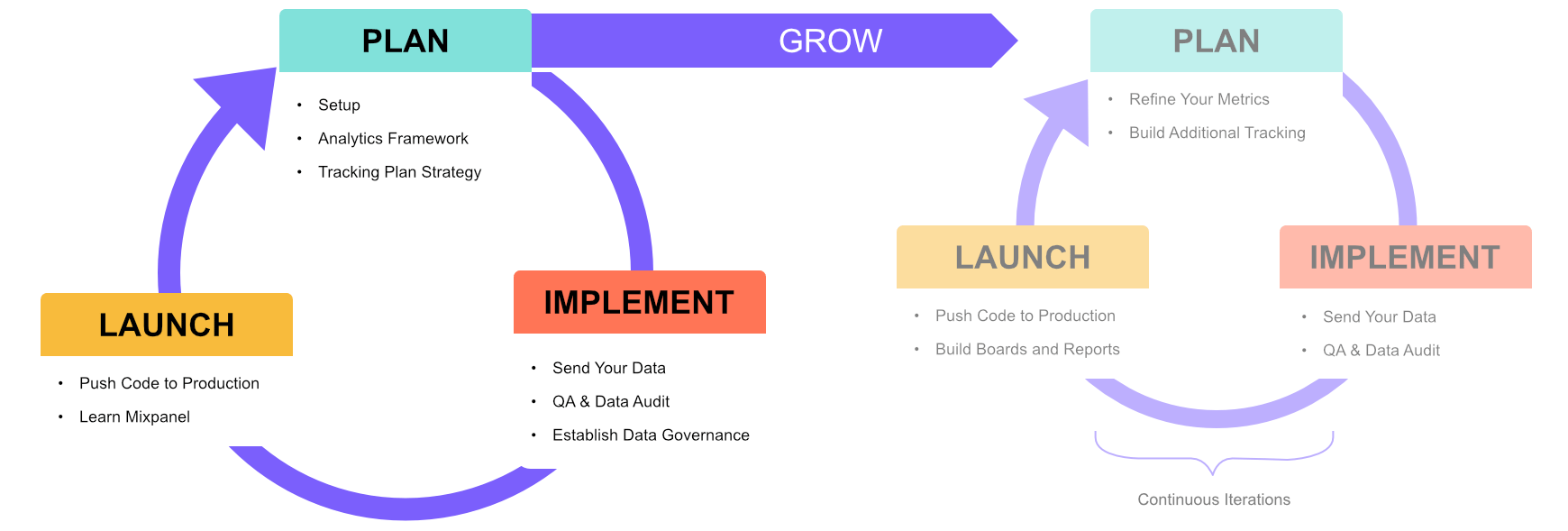
We recommend an iterative 3-step sprint approach to implementing Mixpanel, with each sprint ranging between 1 to 3 weeks. Once you've completed the onboarding, this same process should be repeated in subsequent sprints where you refine and expand your Mixpanel tracking.
 ### Step 1: Plan
**Plan**: If you have not defined your metrics and KPIs (*what you should measure*) that align to your company or product objectives, and need guidance, this section of the tutorials should help you. We will go through how to map these metrics and what the best practices are for defining your events and properties in a [Tracking Plan](/guides/guides-by-workflow/build-tracking-strategy). We’ll also cover setting up your Mixpanel [Organization](/docs/orgs-and-projects/organizations) and [Projects](/docs/orgs-and-projects/managing-projects), especially if this is your first time [signing up](https://mixpanel.com/register).
### Step 2: Implement
**Implement**: We will guide you through [sending your first data](/docs/tracking-methods) into Mixpanel, and the best practices around [Quality Assurance Testing](/guides/guides-by-workflow/ensure-data-quality) and how to audit your data. We will also show you how to establish a [data governance](/guides/guides-by-topic/govern-data) framework to keep your Mixpanel implementation clean, concise, and consistent.
### Step 3: Launch
**Launch**: Once your data is in Mixpanel, we will guide you through rolling out Mixpanel to your wider team and training users on [Mixpanel Fundamentals](https://university.mixpanel.com/student/path/3411736-mixpanel-fundamentals) so they can leverage core reports ([Insights](/docs/reports/insights), [Funnels](/docs/reports/funnels/funnels-overview), [Flows](/docs/reports/flows), and [Retention](/docs/reports/retention)) to analyze user behavior and measure what matters for your product. Finally, we'll help you execute your adoption plan to set your organization up for long-term success after go-live.
### Step 1: Plan
**Plan**: If you have not defined your metrics and KPIs (*what you should measure*) that align to your company or product objectives, and need guidance, this section of the tutorials should help you. We will go through how to map these metrics and what the best practices are for defining your events and properties in a [Tracking Plan](/guides/guides-by-workflow/build-tracking-strategy). We’ll also cover setting up your Mixpanel [Organization](/docs/orgs-and-projects/organizations) and [Projects](/docs/orgs-and-projects/managing-projects), especially if this is your first time [signing up](https://mixpanel.com/register).
### Step 2: Implement
**Implement**: We will guide you through [sending your first data](/docs/tracking-methods) into Mixpanel, and the best practices around [Quality Assurance Testing](/guides/guides-by-workflow/ensure-data-quality) and how to audit your data. We will also show you how to establish a [data governance](/guides/guides-by-topic/govern-data) framework to keep your Mixpanel implementation clean, concise, and consistent.
### Step 3: Launch
**Launch**: Once your data is in Mixpanel, we will guide you through rolling out Mixpanel to your wider team and training users on [Mixpanel Fundamentals](https://university.mixpanel.com/student/path/3411736-mixpanel-fundamentals) so they can leverage core reports ([Insights](/docs/reports/insights), [Funnels](/docs/reports/funnels/funnels-overview), [Flows](/docs/reports/flows), and [Retention](/docs/reports/retention)) to analyze user behavior and measure what matters for your product. Finally, we'll help you execute your adoption plan to set your organization up for long-term success after go-live.